
The Blueprint of a Digital Courier: A Forensic Guide to VPN Architecture
Imagine living in a city where every piece of mail you send is written on a sheet of transparent glass. The postman can read it. The transit driver can read it. The sorting facility scans it. That is the default architecture of the public internet.
When you boot up your laptop and request a webpage, your machine constructs a data packet. This packet wears its source and destination IP addresses proudly on its sleeve. If you are sitting in a coffee shop in Seattle pulling data from a server in Tokyo, every piece of network hardware between you and Japan knows precisely who you are and what you are asking for.
Privacy isn’t a natural feature of the internet; it has to be engineered.
You buy a VPN. You flick the switch. You are told a “secure tunnel” now protects you. But network engineers don’t build tunnels. We build armored courier systems.
A few years ago, I was advising a freelance journalist operating out of a heavily monitored nation. She needed to push raw, gigabyte-heavy video files to an editor in London, but the state telecom firewall was sniffing her traffic and instantly dropping anything that looked like a media upload. We didn’t build her a tunnel. We re- architected how her laptop routed data, manipulating packet flow at the kernel level to disguise her uploads as innocuous, encrypted background noise.
To truly leverage a Virtual Private Network, you need to understand the structural forensics of how it manipulates your data. Let’s strip the system down to the studs.
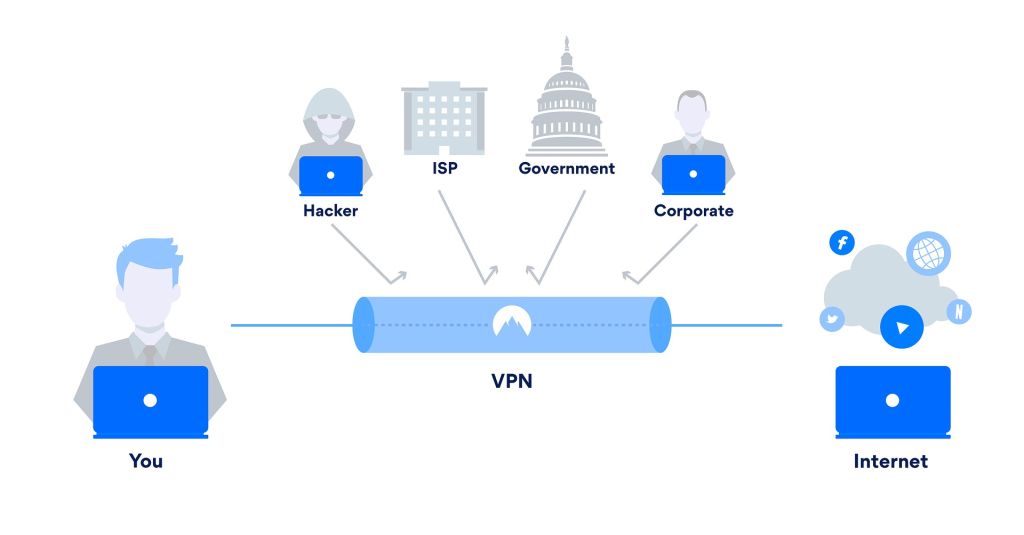
Image Credit: Pixabay under Creative Commons
Phase 1: The Cryptographic Envelope (Encapsulation)
The foundation of VPN architecture relies on a mathematical process called encapsulation.
Your operating system generates a standard IP packet every time you interact with the network. This packet contains two main components: the header (routing metadata) and the payload (the actual video, text, or image data).
If you push that raw packet onto the web, you are entirely exposed. Encapsulation prevents this by turning your original packet into contraband and smuggling it inside a decoy.
The Transformation Sequence
When the VPN client activates, the encapsulation process executes in milliseconds:
- The Scramble: The software takes your entire original packet—header and payload alike—and subjects it to an encryption cipher, typically AES-256 or What was once structured, readable data instantly becomes cryptographic white noise.
- The Decoy Fabrication: Routers cannot read white They need an IP address to know where to send the data. So, the VPN client manufactures a completely new, fake outer packet.
- The Stuffing: The VPN client shoves your scrambled, encrypted original packet into the payload section of this new outer
- The Reroute: It slaps a new header onto the The source is your machine. The destination is the IP address of the remote VPN server.
To the outside world, you aren’t communicating with an editor in London or a banking server in New York. You are simply maintaining a loud, heavily encrypted conversation with a random server in the middle of nowhere.
Phase 2: The Interface Hijack (Virtual Routing)
Here is a structural problem. Your computer’s operating system (whether it is Windows, macOS, or Linux) is incredibly stubborn. By default, its routing table is strictly configured to dump all outbound internet traffic directly into your physical network interface—your Wi-Fi card or Ethernet port.
It doesn’t want to hand your packets over to a third-party VPN application for encryption.
To intercept the traffic, the VPN must execute a local hijack of your machine’s routing logic. It achieves this by spawning a phantom piece of hardware.
The TUN/TAP Phantom
When you install VPN software, you are actually installing a virtual network adapter. The most common implementation is the TUN (Network Tunnel) interface.
The TUN interface does not physically exist. It has no silicon, no antenna, and no cable. But the operating system treats it exactly like a real, physical piece of hardware.
The moment you click “Connect,” the VPN client aggressively overwrites your system’s default routing table. It instructs the OS: “Ignore the Wi-Fi card. Send every single outbound packet into the TUN interface.”
Your OS blindly obeys. It throws all your raw, unencrypted traffic into this virtual interface. The VPN client sits silently behind that interface, catching the raw packets, running the encapsulation sequence described in Phase 1, and then handing the newly armored, encrypted packets directly to the physical Wi-Fi card for transmission.
This loop happens thousands of times a second, completely invisible to the user.
Phase 3: Navigating the Hostile Substrate (Packet Flow)
Once your armored packet leaves the Wi-Fi card, the concept of a “tunnel” entirely vanishes.
Your data does not get a dedicated, private lane on the information superhighway. It is thrown into the exact same chaotic, congested, and hostile public substrate as everyone else. It travels through your local modem, hits your Internet Service Provider’s local node, jumps across Tier 1 backbone providers, and eventually lands at the VPN server’s datacenter.
The ISP Blind Spot
Your ISP controls the physical wires connecting you to the internet. They can see every packet that passes through.
However, because of the encapsulation process, their Deep Packet Inspection (DPI) tools are rendered useless. They look at the packet and see your home IP address sending an encrypted UDP stream to an IP address owned by a server hosting company.
They cannot see what websites you are requesting. They cannot intercept your DNS queries. They are entirely locked out of the payload. They know you are using a VPN, but the contents of your transit remain completely opaque.
The Decapsulation and NAT Wash
What happens when the packet finally reaches the VPN server? The forensic process runs in reverse.
- The VPN server catches the
- It strips away the fake outer
- Using the corresponding cryptographic key, it decrypts the payload, exposing your original packet (e.g., your request to load a webpage).
- The Critical Wash: Before sending your request out to the open web, the VPN server performs Source Network Address Translation (SNAT). It erases your personal IP address from the original packet and replaces it with its own public IP
- The server fires the request to the target
When the website replies, it replies to the VPN server. The server cross-references its NAT table, realizes the data belongs to you, encrypts the reply, packages it in a new outer envelope, and fires it back through the public internet to your machine.
Phase 4: The Physical Constraints of the Flow (MTU)
You cannot discuss packet flow without addressing the physical constraints of network hardware.
Have you ever tried to push a golf ball through a garden hose? That is what happens when a VPN is configured poorly. The internet operates on a strict size limit known as the Maximum Transmission Unit (MTU). Standard Ethernet networks dictate that a packet cannot exceed 1,500 bytes.
If a router receives a packet larger than 1,500 bytes, it panics. It has to slice the packet into multiple smaller chunks to get it through the network—a process called fragmentation. Fragmentation destroys network speed. It spikes latency and frequently causes strict firewalls to drop the traffic entirely.
Here is the architectural rub: Encapsulation adds weight.
When the VPN client wraps your original 1,500-byte packet in a new cryptographic header, it adds roughly 60 to 80 bytes of overhead. Your packet is now 1,580 bytes. It is officially too big for the internet. The moment it hits your local router, it shatters into fragments.
To solve this, professional-grade VPN clients surgically modify your operating system’s internal MTU. They lower your device’s maximum packet size to around 1,420 bytes. This ensures that even after the heavy cryptographic envelope is applied, the final packet still slides smoothly under the 1,500-byte speed limit, ensuring flawless, uninterrupted flow.
Phase 5: The Protocol Engine
The efficiency of this entire architectural operation rests heavily on the VPN protocol governing the logic. The protocol is the engine under the hood.
For two decades, OpenVPN dominated the landscape. It is robust, highly configurable, and tested by time. But structurally, it is a dinosaur. OpenVPN requires hundreds of thousands of lines of code. It operates in “user space,” meaning every single packet has to be handed back and forth between your operating system’s core kernel and the application software. This constant context-switching creates microscopic delays that aggregate into noticeable lag.
Today, the architecture is shifting to WireGuard.
WireGuard is an engineering marvel. It is violently efficient, built with barely 4,000 lines of code. More importantly, it lives directly inside the OS kernel. Packets are encrypted and routed without ever leaving the system’s core, resulting in massive bandwidth throughput and minimal battery drain on mobile devices.
Furthermore, WireGuard embraces stateless architecture. Older protocols maintain complex, fragile “states” with the server; if your connection drops for a millisecond, the protocol tears the connection down and forces a lengthy renegotiation. WireGuard behaves differently. It doesn’t care if your IP address suddenly changes as you walk from your house Wi-Fi to a cellular network. It verifies your cryptographic key and instantly resumes the flow. It is seamless.
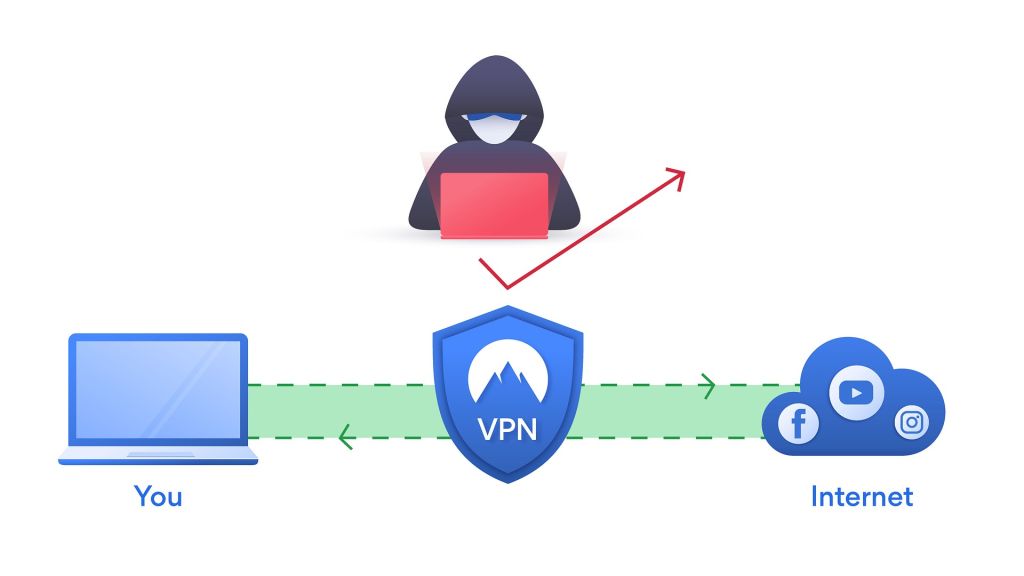
Image Credit: Pixabay under Creative Commons
Frequently Asked Ǫuestions (FAǪ)
1. Does the VPN server decrypt my data?
Yes. The encapsulation process ends at the VPN server. The server must decrypt your packet to read the final destination and forward it to the web. If you are connected to an HTTP (unsecured) website, the VPN provider can see exactly what you are doing. This is why you must only use providers that have mathematically proven, independently audited zero-log architectures.
2. Can my ISP block my VPN connection?
Yes. While they cannot read the contents of the packet, the headers and flow patterns of standard VPN protocols (especially OpenVPN over UDP) are highly distinctive.
Network admins can configure firewalls to drop those specific packets. Advanced VPN architectures bypass this using “Obfuscation,” which wraps the VPN packet inside standard TLS encryption, making it look indistinguishable from standard HTTPS web browsing.
3. Why does my network speed drop even on a premium VPN?
You are adding two massive logistical hurdles to your data. First, cryptographic processing overhead: your CPU is literally doing complex math on every single packet. Second, geographic routing: if you are in London and connect to a server in Japan to access a local London website, your data has to physically travel across the globe twice before it loads on your screen.
Command Your Traffic
The marketing departments at major tech firms want you to think of privacy as a magic shield. Click the button, get the shield. But privacy is not magic. It is logistics. It is architecture.
Your data only remains yours if you control the substrate it travels on. By hijacking the routing tables, utilizing kernel-level protocols like WireGuard, and mastering the MTU constraints of your physical hardware, you stop relying on the inherent trust of the public internet.
You build your own courier network.
Do not settle for default configurations. Audit your current VPN client. Check if you are utilizing modern, stateless protocols. Verify your MTU settings to prevent fragmentation. Take absolute command of your packet flow, because on the modern internet, no one else is going to protect it for you.




